Google+
Showing posts with label Filters. Show all posts

Tuesday, April 14, 2015

#8 - Filtering Data in an AngularJS Collection

In this article we review Filtering Data in an AngularJS Collection,  by developing an Angular App containing a searchable list of items  .
This is the Lesson #8 in the "AngularJS: From 0 To 100" learning tutorials written for absolute Beginners. This article is a continuation of the previous Controllers' Lesson #7  , so please take a look at it.
<<<< PREVIOUS LESSON                             NEXT LESSON >>>>


For this article we're using the  "Brackets"  free Web Editor , with support for developing AngularJS Apps . You can see the 5 minutes tutorial about it in this post.

In this post we'll write an AngularJS App , containing a Controller with the necessary behavior (functionality) to populate an HTML5 list from data in JSON format , and a text box to perform searches on that list at the View.
For now, this JSON collection will be hard-coded inside the Controller, but in further tutorials, it will  be fetched from an OData RESTful Web Service using Ajax requests.
The AngularJS App will look this way :

Filtering Data in an AngularJS Collection 1


Filtering Data in an AngularJS Collection


The first thing for us to do is to load the AngularJS framework and to declare our App :


Filtering Data in an AngularJS Collection 2


<!doctype html><html data-ng-app="MusicApp"><head><title>    Filtering Data Collections</title>     <link href="Controllers.css" rel="stylesheet" type="text/css"  /><script  src="https://ajax.googleapis.com/ajax/libs/angularjs/1.3.7/angular.min.js"></script><script src="Controllers.js" type="text/javascript"></script>
</head>
    
Then we code the data list as we did in our previous lesson , where we exhaustively explained it:

Filtering Data in an AngularJS Collection 3


<body>    <div class="centered">         <h1>Fragile State Discography</h1>             <h2>Neil Cowley (Zero 7) and Ben Mynott</h2>      </div>    <div id="controls1" data-ng-controller="MusicCtl">            <ul >                            <li data-ng-repeat="album in albums  ">                                        .{{$index + 1}}                            <img src="{{album.img}}" alt="{{album.name}}"  >                             <span >{{album.name}} - {{album.price | currency:"USD$" | uppercase}}</span>                    </li>                     </ul>                                    </div>   
Next, we build the Controller, containing the data and the method that loads it inside the list:

Filtering Data in an AngularJS Collection 4


var oMusicApp = angular.module('MusicApp', []);
oMusicApp.controller('MusicCtl', [ '$scope', function ($scope) {                       var albums =             [                {img:"Nocturnal.jpg",name:"Nocturnal Beats",price:"12.50"},                {img:"Facts.jpg",name:"The Facts And The Dreams",price:"11.20"},                {img:"Voices.jpg",name:"Voices From The Dust Bowl",price:"13.70"},                {img:"Pretz.jpg",name:"Soundcastles",price:"14.80"}            ]                                        $scope.fnShowAlbums = function(){                                              $scope.albums = albums;                                             }           }]);


Then, add the data-ng-click directive to call the Controller's method from the View:

Filtering Data in an AngularJS Collection 5

Run the App on the browser:


Filtering Data in an AngularJS Collection 6


And click the button to load the list:

Filtering Data in an AngularJS Collection 7


Finally, we need to add the filter to get only the data that fits to the user search, inside the data-ng-repeat directive. If you like, take a look at the official AngularJS documentation on $filter . 
Therefore, append an input box to input the keyword for search, give it a data-ng-model , and add the expression "filter:" with the model to the repeat directive:

Filtering Data in an AngularJS Collection 8

Run the App:


Filtering Data in an AngularJS Collection 9


And perform a search:

Filtering Data in an AngularJS Collection 10

As you can see, AngularJS takes care automatically of your search, since the AngularJS engine knows where to go to reach the data for the list.
This is one of the fantastic features of AngularJS!!!


Filtering Data in an AngularJS Collection 11


This is the CSS3 style for this App, if you liked it and wanted to copy:

 div[id^=controls]{padding:5px 5px 5px 25px;margin:10px 15px 15px 25px;font:900 12px Comic Sans MS;opacity:0.9;background:#fed;    border:10px solid #ddd;    border-radius: 10px;box-shadow:10px 10px 2px #c0c0c0;}button {padding:5px 5px 5px 5px;margin:10px 15px 15px 15px;width:220px;text-align: center;background:#ddd; font:900 14px Comic Sans MS;opacity:0.9;border:1px solid #c0c0c0;    border-radius: 10px;box-shadow:10px 10px 2px #c0c0c0;}ul{list-style:none;    }input.search {padding:5px 5px 5px 5px;margin:10px 15px 15px 15px;width:190px;text-align: center;background:#fea; font:900 12px Comic Sans MS;opacity:0.9;border:10px solid #ddd;    border-radius: 10px;box-shadow:10px 10px 2px #c0c0c0;}div.centered{ text-align:center   }


That's All!!! You have begun filtering Data Collections in AngularJS . In the next article we will continue to learn Step by Step how to create an HTML5 Form with Validation support and Error Messages using AngularJS. 
Happy programming.....

      by Carmel Schvartzman

<<<< PREVIOUS LESSON                                NEXT LESSON >>>>


כתב: כרמל שוורצמן

Monday, January 19, 2015

#1 - First AngularJS Application For Beginners in 10 minutes

In this article we describe Step by Step How to create a First AngularJS Application For Beginners in 10 minutes,  with a very simple AngularJS setup and introducing AngularJS Expressions and Filters .
This is the Part #1 of the "AngularJS: From 0 To 100" series designed for absolute Beginners.
For this tutorial we'll make use of the open-source Brackets Web Editor, which is lightweight, powerful and very AngularJS friendly. The Brackets installation is explained in this post.
Our AngularJS App will look like this:

First AngularJS Application For Beginners in 10 minutes


First AngularJS Application For Beginners in 10 minutes


The simple AngularJS App that we're building here will look as follows:
First AngularJS Application For Beginners in 10 minutes 1

First thing we need to do is to get the AngularJS framework. But instead of downloading it to our machine, we'll load the script using CDN (Content Delivery Network) . Browse to the official AngularJS web site :
First AngularJS Application For Beginners in 10 minutes 2

Click on the "Download" button:

First AngularJS Application For Beginners in 10 minutes 3

Here choose the latest Branch (version) "Minified" and copy the "CDN" URL: that will give us access to the latest AngularJS version at the GoogleAPIs Ajax library:

First AngularJS Application For Beginners in 10 minutes 4


Don't press the "Download" button: you don't need the AngularJS in your local machine.
Open Brackets and type the following HTML:

First AngularJS Application For Beginners in 10 minutes 6

Insert the CDN AngularJS script that you copy before, and add the AngularJS "ng-app" directive to the HTML tag:

First AngularJS Application For Beginners in 10 minutes 7

Now we'll continue building our example with some headings...

First AngularJS Application For Beginners in 10 minutes 8

...and a list of the high quality "Fragile State" discography:

First AngularJS Application For Beginners in 10 minutes 9


At the top-right Brackets menu, press the "Live Preview" icon to see the HTML in the browser:


First AngularJS Application For Beginners in 10 minutes 10

Next , we'll use some AngularJS Expressions and Filters to add the album's prices.
AngularJS Expressions is code inside double brackets {{ expression }}: take a look at the documentation in the AngularJS web site :

First AngularJS Application For Beginners in 10 minutes 11
 There is also an example there:

First AngularJS Application For Beginners in 10 minutes 12

We'll use AngularJS expressions together with Filters , so read the AngularJS Filters documentation:


In order to show the prices we'll use the Expressions and Filters as follows:

First AngularJS Application For Beginners in 10 minutes 13

This AngularJS expression tell simply that the price is "11.8" , and the Filter says that is "currency" with the type "USD$" , and that there will not be fractions, the price being therefore rounded upwards.
We'll append also expressions for the other prices, but this time , using fractions :

First AngularJS Application For Beginners in 10 minutes 14

Because you enabled the Brackets "Live Preview", every time you SAVE the HTML file, the browser is automatically refreshed:

First AngularJS Application For Beginners in 10 minutes 15

First AngularJS Application For Beginners in 10 minutes 16

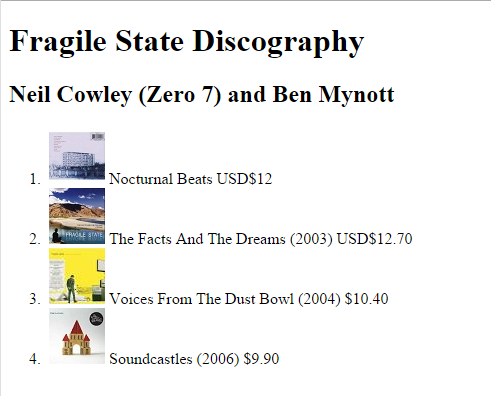
And the final AngularJS View will be as follows:

First AngularJS Application For Beginners in 10 minutes 17


The full AngularJS HTML code is here , to copy-paste:

<!doctype html>
<html ng-app>
<head>
<title>
    My First AngularJS App
</title>
    <script  src="https://ajax.googleapis.com/ajax/libs/angularjs/1.3.7/angular.min.js"></script>
</head>
<body>
    <h1>Fragile State Discography</h1> 
    <h2>Neil Cowley (Zero 7) and Ben Mynott</h2>
    <ol>
        <li ><img src="Nocturnal.jpg" > 
            <span id="no-fractions">Nocturnal Beats  {{11.8 | currency:"USD$":0}}  </span>
                                                                                                         </li>
        <li ><img src="Facts.jpg" > 
            <span id="fractions">The Facts And The Dreams (2003) 
                {{12.7 | currency:"USD$"}}</span>
        </li>
        <li ><img src="Voices.jpg" > 
            <span>Voices From The Dust Bowl (2004)  {{10.4 | currency}}</span>
        </li>
        <li ><img src="Pretz.jpg" > 
            <span>Soundcastles (2006)    {{9.9 | currency | uppercase}}</span>
        </li>
     </ol>

</body>
</html>


That All!!! You have begun using the AngularJS javascript framework . In this article we learned Step by Step How to create a First AngularJS Application For Beginners in 10 minutes. 
In the next article we will learn Step by Step What are Directives in AngularJS. 

Happy programming.....

      by Carmel Schvartzman


                                                             NEXT LESSON >>>>


כתב: כרמל שוורצמן